Printing Date Column
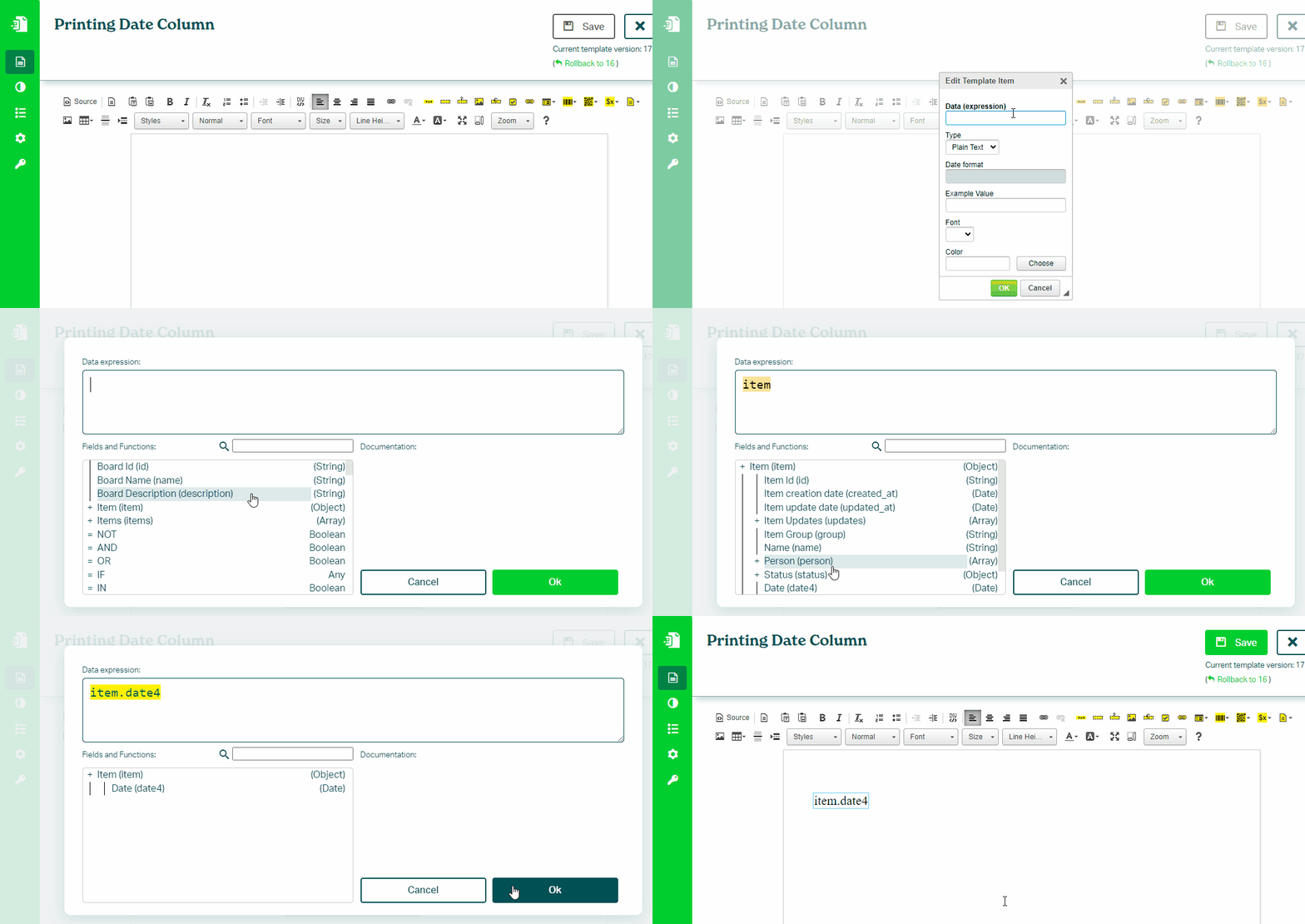
To print a value from a Date column in your monday.com board, follow these steps:
- In the Eledo editor, add a Text Box component
- Click into Data (expression) to open the expression builder
- Select a date field (for example:
item.date) - Optionally format the value using DATE functions
- Confirm and place the value into the document
Formatting Dates
Format dates using:
DATE(value, format)
Examples:
DATE(item.date, "MM/dd/yyyy")
→ 07/14/2025

DATE(item.date, "dd/MM/yyyy")
→ 14/07/2025

DATE(item.date, "EEEE, MMMM d, yyyy")
→ Monday, July 14, 2025

DATE(item.date, "dd MMMM yyyy")
→ 14 July 2025
Tips
Print today’s date:
DATE(TODAY(), "yyyy-MM-dd")
Calculate difference in days:
DAYS_BETWEEN(item.date, item.date_1)
→ 19
See also:
Was this article helpful?
Yes
No