Printing Number Column
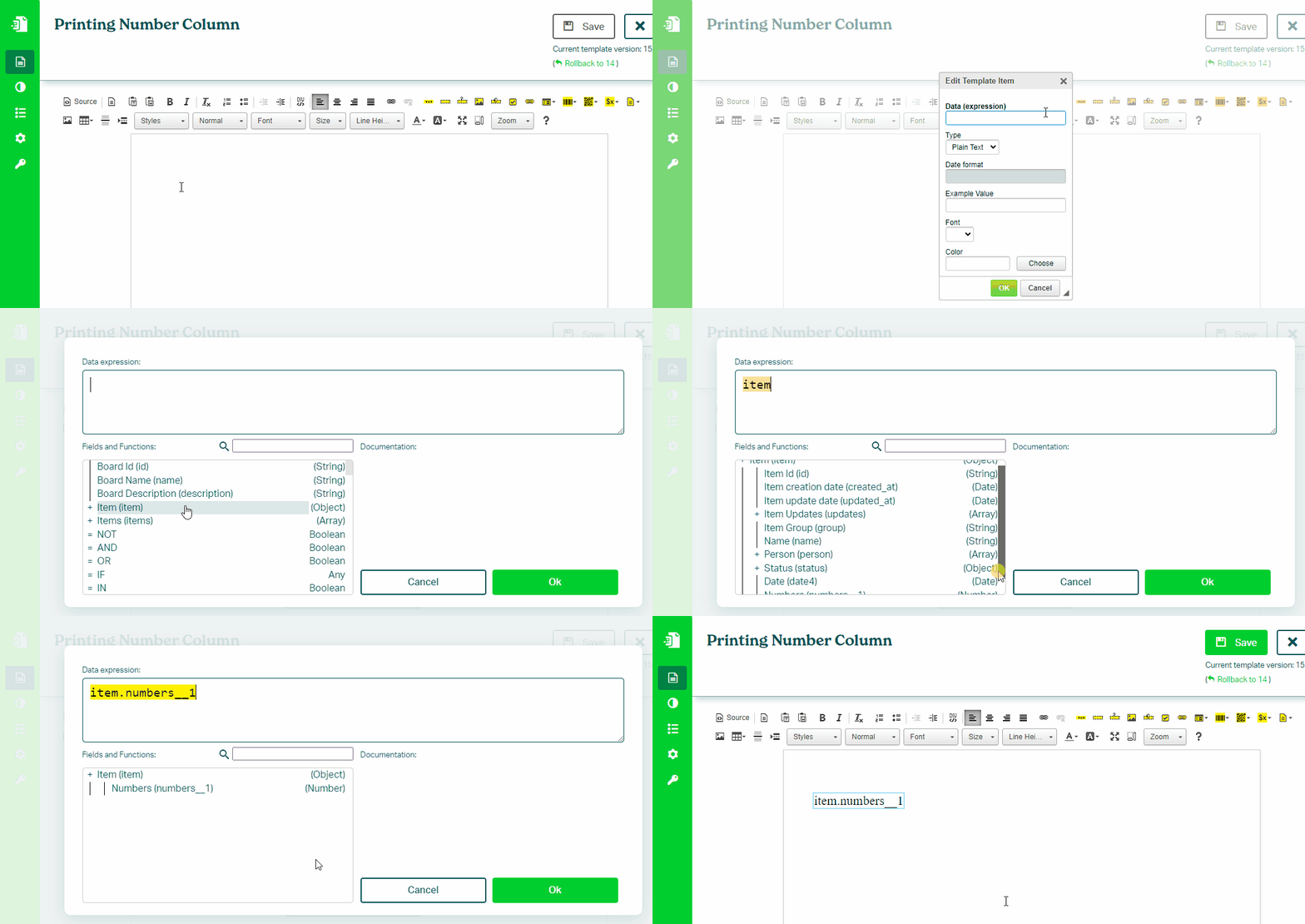
To print a value from a Number column in your monday.com board, follow these steps:
- In the Eledo editor, add a Text Box component
- Click into Data (expression) to open the expression builder
- Select a number field (for example:
item.number) - Optionally format the value using number functions
- Confirm and place the value into the document
Formatting Numbers
Currency Format
Format a number using:
CURR(value, leading_zeroes, decimal_places)
Example:
CURR(item.number, 0, 2)
→ 56,789.99
Number Format
Format a number without thousands separators:
NUM(value, leading_zeroes, decimal_places)
Examples:
NUM(item.number, 0, 2)
→ 12345.00
NUM(item.number, 8, 0)
→ 00012345
Tips
To round values:
CURR(ROUND(item.number, 2), 0, 2)
→ 1234.57
To add a currency symbol:
CONCAT("$", CURR(item.number, 0, 2))
→ $56,789.99
See also:
Was this article helpful?
Yes
No