Printing QR Codes
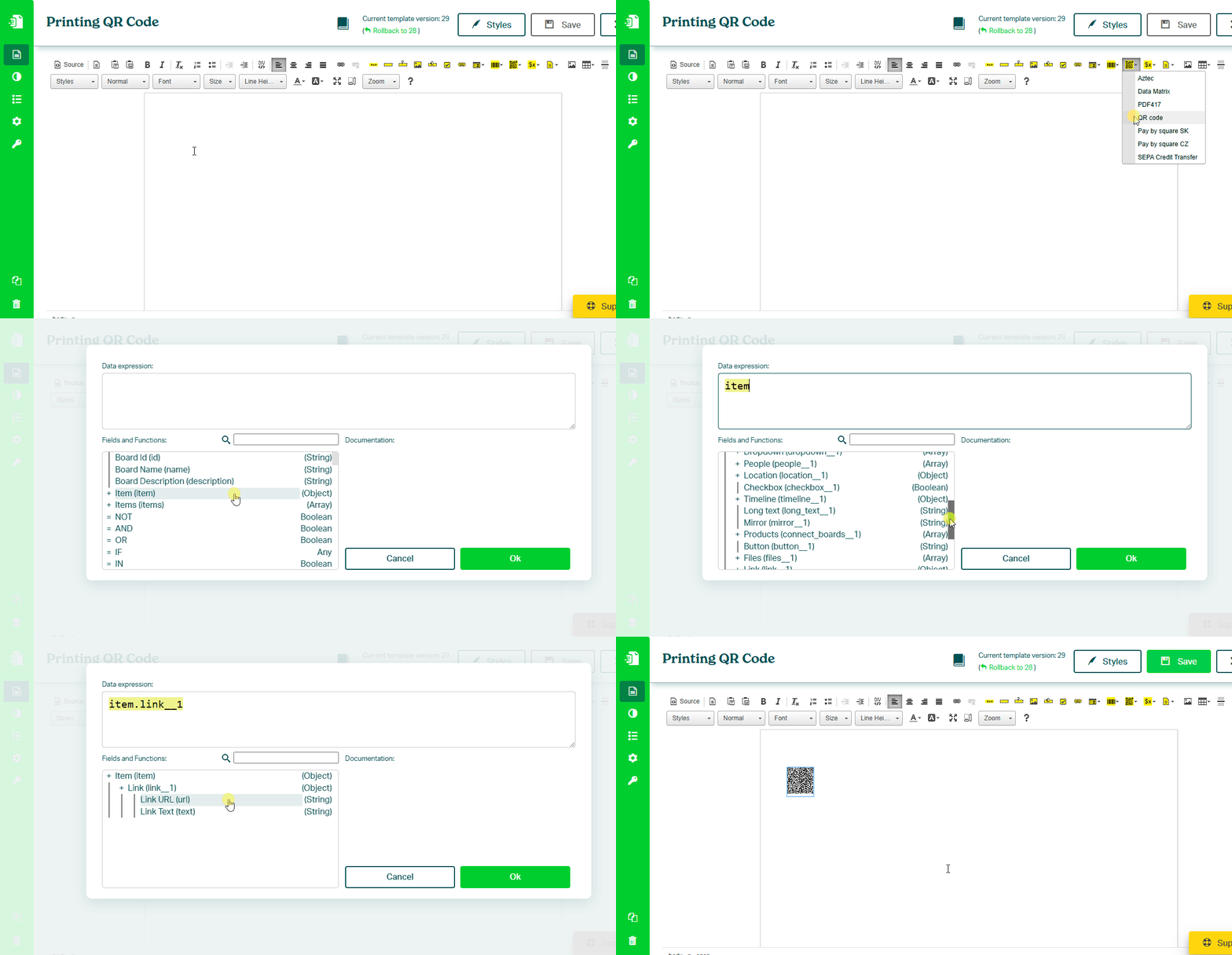
To print a QR code from a monday.com item, follow these steps:
- In the Eledo editor, click Barcodes 2D and select the QR Code component
- Click into Data (expression) to open the expression builder
- Select a field from the Fields panel (for example
item.link.url) - Confirm and place the QR code into the document
QR Code Content Types
QR codes encode text — the format of the value determines how it behaves when scanned.
Below are common examples.
URL (Website Links)
Opens a webpage.
Example:
https://example.com
Data expression:
item.link.url
Phone Number
Opens the phone dialer with the number pre-filled.
Example:
tel:+1234567890
Data expression:
CONCAT("tel:", item.phone)
Email Address
Opens the email client with predefined content.
Example:
mailto:support@example.com?subject=Feedback&body=Hello!
Data expression:
CONCAT("mailto:", item.email, "?subject=Feedback&body=Hello!")
More Use Cases
See: Generating QR Codes
Was this article helpful?
Yes
No