Block Repetition
Block Repetition allows you to repeat part of your document based on an array of data.
You define one block of content, and Eledo duplicates it for each item in the input array.
This is commonly used for:
- invoice line items
- table rows
- lists of products or services
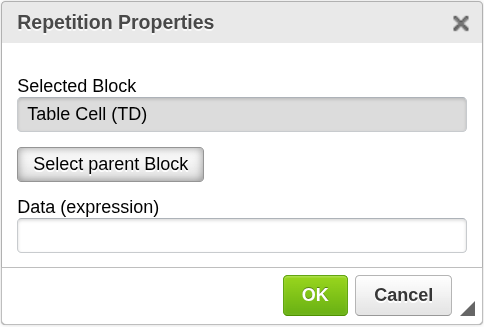
How it works
Block Repetition evaluates a Data (expression) that returns an array.
For each item in the array:
- the selected block is duplicated
- the data context is set to the current item
This means you can use fields inside the block that refer to properties of each item.
Add Block Repetition
To create a repetition block:
- Select the content you want to repeat
or place the cursor inside that content - Click the Block Repetition icon in the top toolbar
- The selected block will be highlighted in yellow
- If needed, use Select parent block to expand the selection
- The configuration window will open
- Confirm to apply repetition
Block Repetition is intended to be used on existing content.
It is not used to insert an empty block.

Selecting the correct block
Sometimes the first selected element is too small.
For example, if your cursor is inside a table cell, you may want to repeat:
- the cell
- the whole row
- or the entire table
Use Select parent block to move up through the document hierarchy until the correct block is selected.
For example:
- table cell → table row → table
This helps you choose exactly which part of the document should be repeated.
Configuration
Data (expression)
Defines the array that controls how many times the block is repeated.
- Must evaluate to an array
- Each item becomes one instance of the block
Examples:
LineItems
Repeats the block for each item in the LineItems array.
for(1, 10)
Generates 10 items and repeats the block 10 times.
Special variables
$current
Represents the current value in a block repetition.
Example:
UNIQUE(items, team)
Inside the repetition:
$current
This refers to the current unique value of team.
parent
Allows access to data from the parent context in nested repetitions.
Example:
FILTER(parent.items, $current == team)
parent.items refers to the original array outside the current repetition.
Important notes
- Block Repetition should be applied to existing content
- The selected block is highlighted before you confirm the action
- Each repeated block gets its own data context
- Fields inside the block can refer to properties of the current item
When to use Block Repetition
Use Block Repetition when you need to:
- display a list of items
- generate dynamic table rows
- repeat structured content based on input data
Next steps
- Learn how expressions work → Expressions
- Control visibility of repeated content → Block Condition