Dynamic Color
Dynamic Color allows you to change the text or background color of a selected block.
This makes it possible to visually highlight content based on data or conditions.
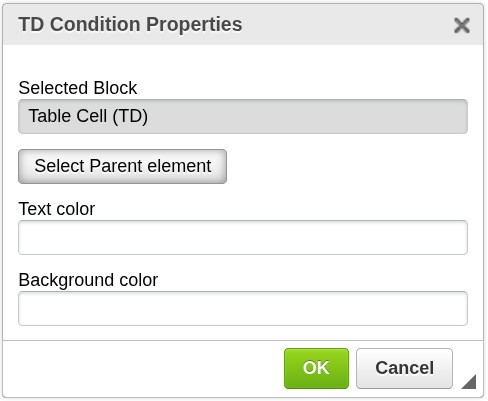
How it works
Dynamic Color applies styling to a selected block.
The color can be defined dynamically using expressions, allowing the appearance of the document to change based on input data.
Add Dynamic Color
To apply dynamic color:
- Select the content you want to style
or place the cursor inside that content - Click the Dynamic Color icon in the top toolbar
- The selected block will be highlighted
- If needed, use Select parent block to expand the selection
- The configuration window will open
- Configure the color settings
- Confirm to apply the changes
Dynamic Color is applied to existing content.
It is not used to insert new elements.

Selecting the correct block
Sometimes the initially selected element is too small.
For example, if your cursor is inside a table cell, you may want to apply color to:
- the text inside the cell
- the entire cell
- the whole row
Use Select parent block to move up through the document hierarchy.
For example:
- text → table cell → table row → table
Configuration
Text color
Defines the color of the text.
- Optional
- Overrides the default text color
Background color
Defines the background color of the selected block.
- Optional
- Useful for highlighting or emphasizing content
Important notes
- Dynamic Color is applied to existing content
- The selected block is highlighted before confirmation
- Colors are applied during document generation
- Final appearance depends on the PDF rendering
When to use Dynamic Color
Use this component when you need to:
- highlight important values
- indicate status (e.g. success, warning, error)
- improve readability of generated documents
Next steps
- Control visibility → Block Condition
- Repeat styled content → Block Repetition