Image
An Image allows you to insert a static image directly into your document.
Unlike Dynamic Image, the image is configured once in the template and does not change during document generation.
Use Dynamic Image when the image should come from data and change for each generated document.
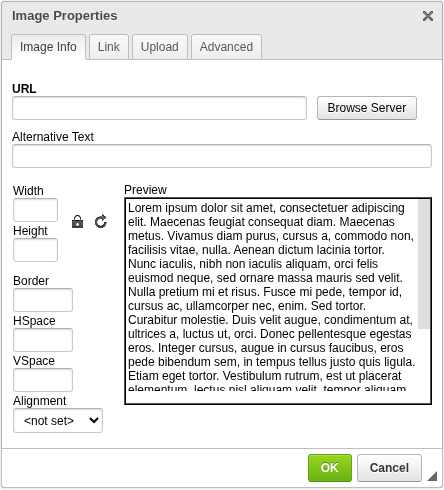
Add an Image
To insert an image into your document:
- Place the cursor where you want the image to appear
- Click the Image icon in the toolbar
- Configure the image settings
- Confirm to insert the image
The image will be inserted at the cursor position.

Configuration
URL
Defines the source of the image.
- Can be an external URL
- Or selected from the server
Alternative Text
Defines a textual description of the image.
- Used for accessibility
- Displayed when the image cannot be loaded
Width / Height
Defines the size of the image.
- Can be set independently
- If only one dimension is set, the aspect ratio is preserved
Border
Defines the border size around the image.
Alignment
Controls how the image is positioned within the document.
Options:
- left
- right
Link
You can turn the image into a clickable link.
URL
Defines the destination link.
Target
Controls how the link is opened:
- Same window (
_self) - New window (
_blank) - Parent / top window
Upload
Allows you to upload an image to the server.
- The uploaded file can then be used as the image source
Advanced
Provides additional configuration options:
- Id — internal identifier
- Language Direction — text direction (LTR / RTL)
- Language Code — language metadata
- Long Description URL — extended description
- Stylesheet Classes — CSS classes
- Style — inline styling
When to use Image
Use Image when you need:
- static logos or branding
- fixed visual elements
- decorative or layout images
When to use Dynamic Image instead
Use Dynamic Image when:
- the image comes from data
- the image changes per document
- you need runtime flexibility
Next steps
- Use data-driven images → Dynamic Image
- Learn how layout works → Table