Guided Fields
What Are Guided Fields?
Guided Fields are the default and recommended way to send data to Eledo when working with simple templates.
Instead of writing raw JSON, you enter values into structured field groups directly inside the n8n node configuration.
Guided Fields are designed for templates with a flat structure — for example:
- First name
- Last name
- Birthdate
- Invoice number
- Total price
If your template consists of independent fields like these, Guided Fields are the simplest and fastest way to configure your workflow.
How Guided Fields Work
n8n does not support dynamically generated forms. While the Eledo node can load your template, the user interface cannot automatically rebuild itself based on the template structure.
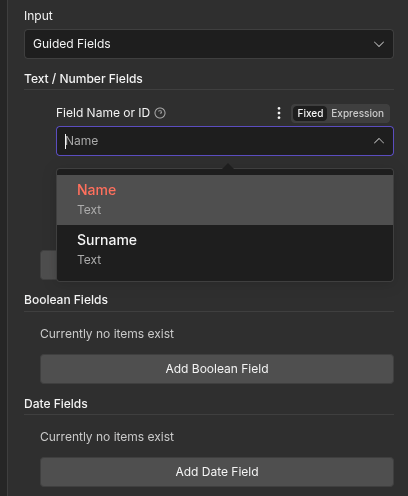
To solve this, we group fields into three categories:
- Text / Number Fields — For text and numeric values
- Boolean Fields — For true/false or on/off values
- Date Fields — For date and time values
You select the template field from a pre-populated list and provide its value in the appropriate group.
For example:
firstNameandlastNamego into Text / Number Fieldsbirthdategoes into Date Fields
This structure keeps configuration simple while still reflecting the expected data type.
Limitations
Guided Fields support templates with a flat hierarchy.
They are suitable for templates that contain:
- Text fields
- Number fields
- Boolean fields
- Date and time fields
They do not support nested objects or complex structured data.
In practice, flat templates represent approximately 70–80% of common automation use cases.
Repeated Fields
It is technically possible to enter the same field name multiple times.
If this happens, Eledo accepts the last value provided.
Example:
- First entry:
firstName = Mark - Second entry:
firstName = John
The generated PDF will use John.
When to Use Guided Fields
Use Guided Fields when:
- Your template has a flat structure
- You want the simplest possible setup
- You are testing or prototyping a workflow
Guided Fields are ideal for quick setup and non-technical users.
Working With Complex Templates
If your template contains nested objects (for example, a person object with multiple sub-fields), Guided Fields will not expose those nested attributes.
In such cases:
- You may start with Guided Fields for basic testing.
- Once you need full control, switch the Input Mode to JSON.
JSON mode allows you to send structured data and supports all complex objects.
Refer to the JSON Input Mode documentation for detailed instructions.
Why We Built Guided Fields
Many integrations rely exclusively on JSON input.
While JSON is powerful, it requires technical knowledge and familiarity with data structures.
We designed Guided Fields to provide a simpler alternative for the majority of use cases.
They offer a balance between usability and flexibility while respecting the limitations of the n8n interface.