Block Condition
Block Condition controls whether part of your document is visible based on a condition.
You define a block and specify a condition.
When the document is generated:
- if the condition is
true, the block is shown - if the condition is
false, the block is hidden
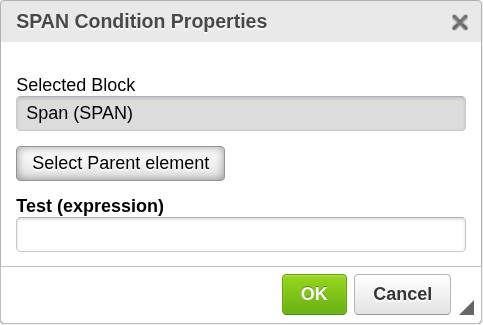
How it works
Block Condition evaluates a Test (expression).
The result is interpreted as a boolean value and determines whether the selected block is included in the final document.
Add Block Condition
To apply a condition to a block:
- Select the content you want to control
or place the cursor inside that content - Click the Block Condition icon in the top toolbar
- The selected block will be highlighted in yellow
- If needed, use Select parent block to expand the selection
- The configuration window will open
- Enter your condition and confirm
Block Condition is intended to be applied to existing content.
It is not used to insert an empty block.

Selecting the correct block
Sometimes the initially selected element is too small.
For example, if your cursor is inside a table cell, you may want to apply the condition to:
- the cell
- the entire row
- or a larger section
Use Select parent block to move up through the document hierarchy until the correct block is selected.
For example:
- table cell → table row → table
Configuration
Test (expression)
Defines the condition that controls visibility.
- Must evaluate to a boolean value
- Determines whether the block is shown or hidden
Examples:
Surname
The block is shown if Surname is populated.
quantity > 0
The block is shown only if quantity is greater than 0.
Type conversion
If the expression does not return a boolean directly, it is converted automatically.
The result evaluates to true when:
- Number — value is not
0 - String — value is not empty
- Array — contains at least one item
Otherwise, the result is false.
Important notes
- Block Condition is applied to existing content
- The selected block is highlighted before confirmation
- The condition is evaluated during document generation
- Hidden blocks are not included in the final document
When to use Block Condition
Use Block Condition when you need to:
- show or hide optional sections
- conditionally display content based on data
- avoid empty or irrelevant fields in the final document
Next steps
- Learn how expressions work → Expressions
- Repeat conditional content → Block Repetition