2D Barcodes
2D Barcodes encode data in two dimensions, allowing them to store more information than 1D barcodes.
They are commonly used for links, payments, and structured data.
Add a 2D Barcode
To insert a 2D barcode:
- Place the cursor where you want the barcode
- Click the 2D Barcode dropdown in the toolbar
- Select a barcode type
- Configure the data
- Confirm to insert
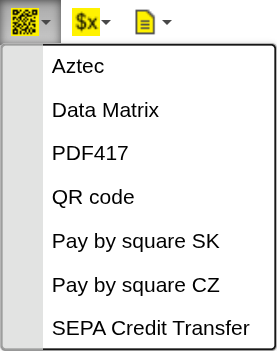
Supported types
- QR Code
- Data Matrix
- PDF417
- Aztec
- Pay by Square (SK / CZ)
- SEPA Credit Transfer
Configuration
All 2D barcodes share the same configuration options.
Size
Controls the overall size of the barcode.
Available options:
- small
- medium
- large
- extra
Zoom
Scales the barcode.
Available options:
- 1x
- 2x
- 3x
This allows you to increase the barcode size without changing its layout.
Data (expression)
Defines the value encoded in the barcode.
- Must match the format required by the selected barcode type
- Evaluated during document generation
QR codes encode text — the format of the text determines how the QR code behaves when scanned.
Different barcode types may have specific requirements for the data format.
Example:
ProductCode
When to use 2D Barcodes
Use 2D Barcodes when you need:
- encode larger amounts of data
- include URLs or links
- generate payment codes (e.g. SEPA, Pay by Square)
- store structured or machine-readable data
2D barcodes are more flexible than 1D barcodes and can represent complex information in a compact space.
Next steps
- Use simpler formats → 1D Barcodes
- Learn how expressions work → Expressions