Variables
Variables allow you to insert system-generated values into your document.
These values are not provided by input data — they are generated automatically during document creation.
Add a Variable
To insert a variable into your document:
- Place the cursor where you want the value to appear
- Click the Variables icon in the toolbar
- Select a variable from the dropdown
The variable will be inserted at the cursor position.
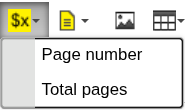
Available variables
Page number
Inserts the current page number.
Total pages
Inserts the total number of pages in the document.
How it works
- Values are resolved automatically during document generation
- No configuration is required
- Variables update based on the final document layout
When to use Variables
Use Variables when you need:
- page numbering (e.g. "Page 1 of 10")
- document-level metadata
- automatically calculated values
Next steps
- Control pagination → Page Break
- Structure content → Table
Was this article helpful?
Yes
No