Output Modes
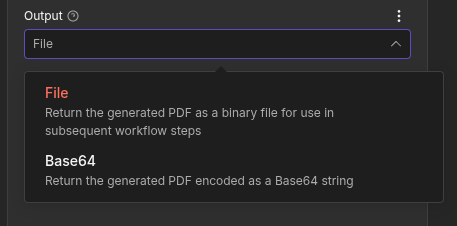
Eledo supports two output modes — File (default) and Base64. In most workflows, you should keep the default File mode.
File Mode (Recommended)
This is the native Eledo output mode. You send a request and Eledo returns binary PDF data.
We strongly recommend using this mode unless your workflow requires special handling.
After configuring the node, click Execute step. On the right side of the n8n interface, you will see the generated file along with its metadata. You can download the file directly and inspect its contents.
In this mode, the PDF is available as binary data in downstream nodes.
Base64 Mode
Base64 mode is a wrapper around the same PDF output.
Instead of returning binary data, the PDF is encoded as a Base64 string and returned inside JSON.
This can be useful in workflows where:
- You need to send the document via HTTP request
- You must embed the PDF inside another JSON structure
- Your downstream system expects Base64 content
Example output:
{
  "pdfBase64": "JVBERi0xL...",
  "filename": "0_0.pdf",
  "mimeType": "application/pdf"
}
Using the Output in Other Nodes
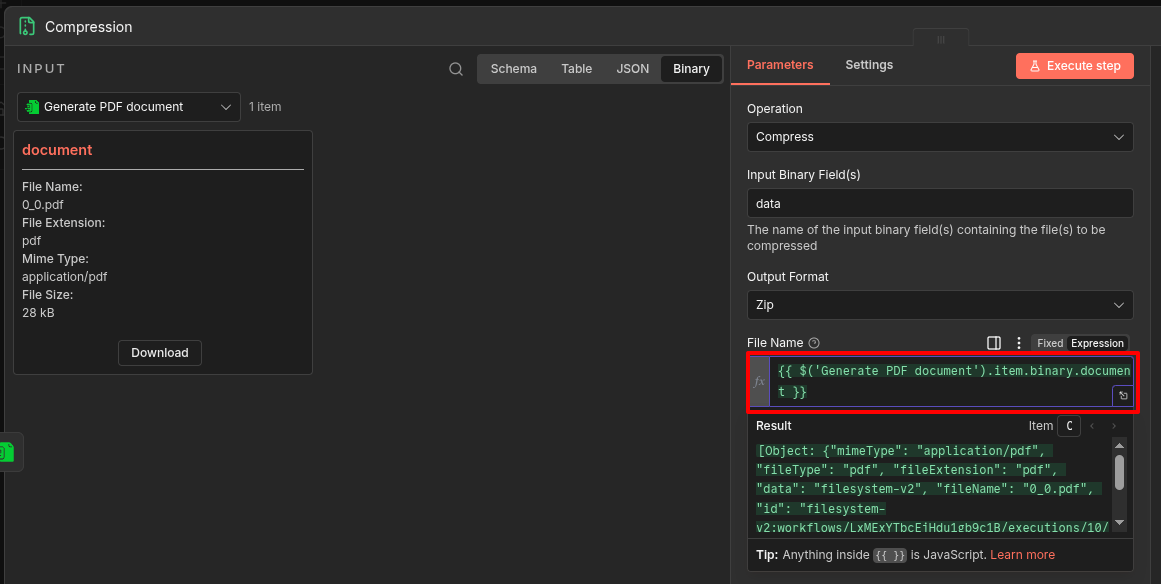
In nodes connected after the Eledo node, you can reference the output by switching a field from Fixed to Expression mode.
Referencing File Mode (Binary)
In File mode, the PDF is available under the binary property.
Example:
{{ $('Generate PDF document').item.binary.document }}
(The property name may vary depending on your configuration.)
Referencing Base64 Mode (JSON)
In Base64 mode, the data is available inside json.
Example:
{{ $('Generate PDF document').item.json }}
You can also reference individual fields, such as pdfBase64 or filename, using n8n expressions.
Tip: Type
{{inside any expression field and rely on n8n's interactive autocompletion to explore available properties.