Overview
What is Eledo?
Eledo is a service for generating PDF documents through automation.
Imagine running an e-shop and needing to create an invoice for every order. With Eledo, this process can be fully automated.
You need two things:
- A template — you define what the document should contain (for example: name, address, order details).
- A connection between Eledo and your data — this is usually done via integrations such as Zapier, Make, monday.com, or n8n.
The setup is done once. After that, Eledo runs silently in the background.
Templates are created using our visual editor. We also support fillable PDF forms, which are handled as a specific template type.
Eledo + Make integration
Eledo offers official support for Make. The Eledo app is already available on the platform — there is nothing to install.
A typical flow is straightforward:
- Create a new scenario in Make.
- Select a module that provides input data — for example, Google Sheets.
- Add an Eledo module to generate the PDF.
- In Eledo, select a template and map your input fields.
- Optionally, add more modules — for example, upload the generated PDF to Google Drive or send it by email.
Once configured, Eledo becomes another module in your scenario.
In Make, a scenario consists of connected modules. After building it, you must still configure how and when the scenario should run.
In the following pages, we explain everything step by step — starting with simple examples and high-level concepts, then covering practical use cases and key limitations.
The goal is clarity. You should know what to expect at each step.
Designed to be practical
Eledo is designed to be tolerant to incomplete input.
If you send partial data, we still attempt to render the PDF. Missing fields will remain empty, but the document will still be generated.
We chose this strategy deliberately — because in many real-world scenarios, receiving a partially filled document is better than receiving no document at all.
For more complex templates with repeatable items, Make provides better support for multiple entries than some simpler automation platforms.
Ready-Made Scenario Template (Optional)
Eledo provides a public Make scenario template for a common automation pattern:
Shopify order → Eledo PDF invoice → Google Drive / Gmail
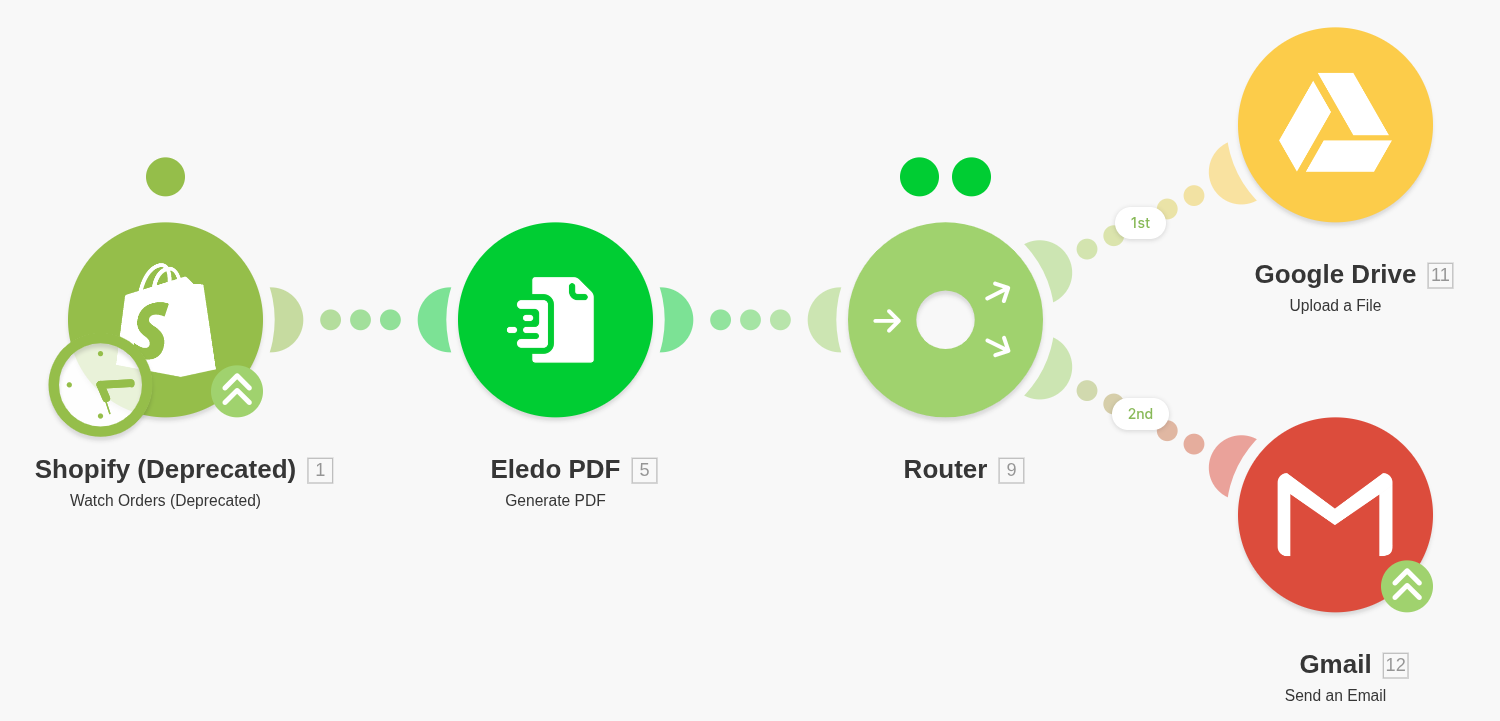
In this scenario:
- Shopify provides the source data
- Eledo generates the invoice PDF
- The result is then delivered to other services
In the published example, the generated invoice is:
- uploaded to Google Drive
- sent to the customer by Gmail
This is a good reference because it demonstrates a typical document automation flow:
- data source → where the input comes from
- document generation → where Eledo generates the PDF
- delivery → where the generated file is stored or sent
Note: The Shopify module used in the public template is currently marked as deprecated. Even if a specific third-party module changes over time, the overall scenario pattern remains valid and can still be recreated manually by following this documentation.
You can also build the same automation manually step by step using the guides in this documentation.
What to expect in this documentation
This documentation is split into focused sections. You do not need to read everything — open the part relevant to your current task.
We cover:
- Adding Eledo to your scenario
- Authentication setup
- Data input
- Data output
- Troubleshooting
- Step-by-step guides for common scenarios
If something is unclear or missing, it means the documentation needs improvement — not that the feature is necessarily unsupported.